

Choosing the right Power Distribution Unit (PDU) is crucial for any business. The right PDU ensures that operations run smoothly and efficiently. Buyers should pay attention to key specifications, such as the protocol data unit (PDU) and its role in data management, that can significantly impact operational efficiency. For instance, understanding compliance issues related to the protocol data unit OSI model is vital. Many B2B buyers face challenges like routing guides and labeling standards that can lead to delays or penalties. Balancing these specifications with budget considerations can make a big difference in the long run.
Tip: Always verify that your Basic PDU meets the necessary compliance standards to avoid any potential setbacks.
Key Takeaways
- Understand power capacity ratings to choose a PDU that meets your equipment needs.
- Follow the 80% rule to prevent overloads and ensure reliability in high-demand environments.
- Consider the form factor of PDUs, choosing between rack-mounted and standalone options based on your setup.
- Evaluate input and output configurations to ensure compatibility with your existing infrastructure.
- Utilize remote monitoring features to gain real-time insights and enhance operational efficiency.
- Check for compliance and safety standards to protect your equipment and ensure safe operations.
- Implement load balancing to evenly distribute electrical loads and prevent equipment failure.
- Consult with experts if unsure about your specific PDU requirements to make informed decisions.
Power Capacity

When it comes to selecting a Power Distribution Unit (PDU), understanding power capacity is essential. This specification directly impacts how well your equipment operates and how efficiently your data center runs.
Understanding Power Ratings
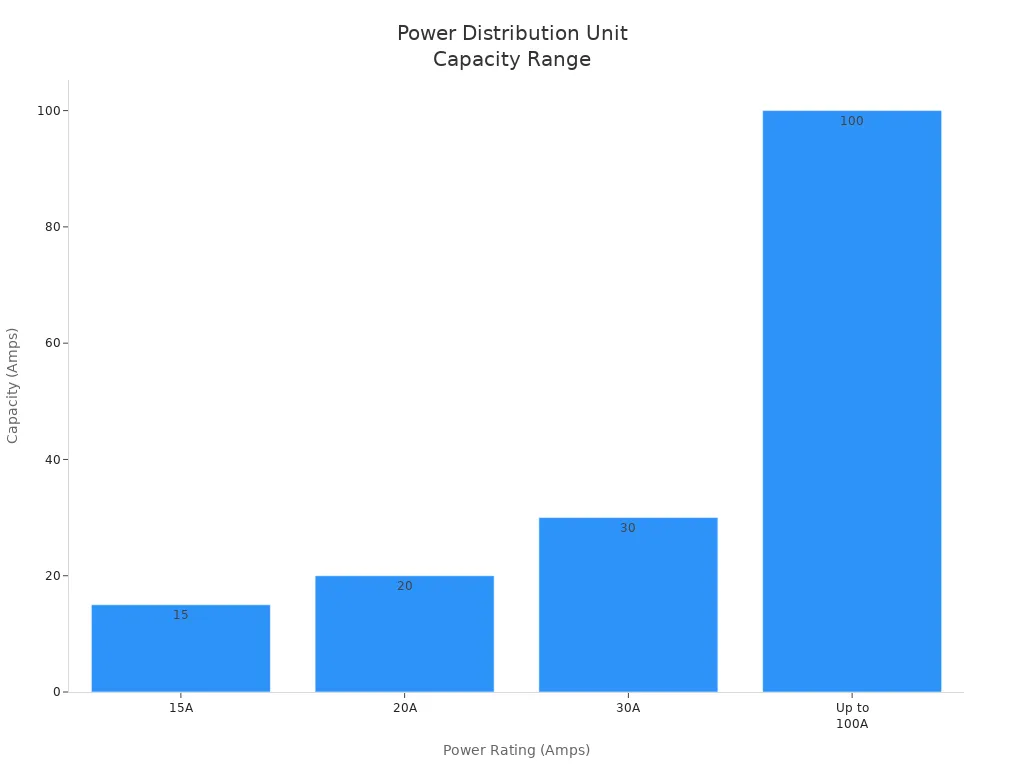
Power ratings indicate how much electrical load a PDU can handle. Buyers should pay attention to these ratings to ensure they choose a unit that meets their needs. Here’s a quick overview of typical power ratings:
| Power Rating | Description |
|---|---|
| 15A | Common for smaller setups, suitable for low power consumption devices. |
| 20A | Standard for moderate power needs, often used in office environments. |
| 30A | Ideal for higher power requirements, supports more devices. |
| Up to 100A | Suitable for high-density data centers, especially for AI workloads. |
Selecting the right power rating helps prevent overloads. The 80% rule suggests that you should only load a PDU to 80% of its capacity. This practice ensures reliability and longevity, especially in high-demand environments.
Load Balancing
Load balancing is another critical aspect of power capacity. It ensures that electrical loads distribute evenly across outlets. This practice prevents overloading and reduces the risk of equipment failure. Here are some best practices for effective load balancing:
| Best Practice | Description |
|---|---|
| Load Balancing | Ensures electrical loads are evenly distributed across outlets to prevent overloading. |
| Implement Load Monitoring | Regularly monitor loads to prevent overloading and optimize performance. |
| Optimize Power Distribution Layout | Design layout to minimize cable lengths and reduce voltage drop for improved efficiency. |
Improper load balancing can lead to overheating, which shortens the lifespan of your equipment. By maintaining balanced loads, businesses can enhance the reliability of their PDUs and ensure continuous operation.
Form Factor
When selecting a Power Distribution Unit (PDU), the form factor plays a significant role in how well it fits into your existing infrastructure. Buyers often face the choice between rack-mounted and standalone units, each with its own set of advantages and disadvantages.
Rack-Mount vs. Standalone
Rack-mounted PDUs are designed to fit directly into server racks. This design saves space and keeps equipment organized. Here are some benefits of rack-mounted PDUs:
- They save space by being installed directly in server racks, keeping equipment organized and cables tidy.
- They provide precise power delivery to each device, helping to avoid overloads.
On the other hand, standalone PDUs are not fixed in one location. They can be moved around as needed, which is great for temporary setups. However, basic PDUs can lead to inefficiencies and increased downtime due to their lack of advanced features needed for modern IT environments.
Size and Dimensions
The size and dimensions of a PDU significantly influence its compatibility with existing racks. When planning for server racks, consider the strategy behind the dimensions. Factors such as available floor space, cooling, and power integrations play a significant role in ensuring that the PDUs fit well.
Tip: The need for a power distribution unit (PDU) and cables directly impacts the data center server rack’s depth. If more cables and PDUs are required, deeper racks are needed.
Here’s a quick overview of how different dimensions affect compatibility:
| Dimension Type | Impact on Compatibility |
|---|---|
| Depth | Affects cable management and the need for deeper racks if more cables and PDUs are required. |
| Width | Influences space planning and the options available for devices. Wider racks offer more flexibility. |
| Height | Determines the number of devices that can fit, impacting power and cooling needs. |
Additionally, consider these factors when evaluating size and dimensions:
- Available Floor Space
- Cooling Requirements
- Power Integrations
- Cable Management Strategies
- Future Data Center Growth
By carefully assessing the form factor and dimensions of PDUs, businesses can optimize their power distribution setup, ensuring efficiency and reliability in their operations.
Input and Output Configuration
When selecting a Power Distribution Unit (PDU), understanding the input and output configurations is crucial. These configurations determine how well the PDU integrates with existing infrastructure and can significantly affect installation time.
Types of Input Connectors
Input connectors play a vital role in how a PDU connects to the power source. Choosing the right type can streamline installation and enhance compatibility. Here’s a breakdown of common input configuration types:
| Input Configuration Type | Description |
|---|---|
| Cam-Lock Connectors | Common type of main feed input connection. |
| Pin & Sleeve | Less common type of input connection. |
| Company Switch | Connects to house power via mating connectors. |
| Circuit Breaker Panel | Direct hard-wiring to a circuit breaker panel. |
| Disconnect Switch | Alternative connection method to house power. |
| Main Power Distribution Units | Distributes power to various devices. |
| Satellite Branch Circuit Power Equipment | Distributes power from the main PDU. |
| Breakered Stringer Box | Provides additional power distribution. |
| Rack-mounted PDU | Compact power distribution for racks. |
| Output Cam-Lock Connectors | Allows daisy chaining of multiple PDUs. |
Selecting appropriate connectors can minimize onsite complications, making the installation process smoother. In B2B settings, these configurations significantly influence compatibility with existing systems. For example, using visual editing tools can help ensure that different data formats integrate seamlessly, enhancing overall efficiency.
Output Receptacles
Output receptacles are equally important as they determine how devices connect to the PDU. The right receptacle configuration can optimize power delivery and ensure safety. Here’s a look at typical output receptacle configurations:
| Standard | Type | Voltage Rating | Current Rating | Example Configuration |
|---|---|---|---|---|
| NEMA | Receptacle | 125-600 V | 15-60 A | 5-15R, L5-15R, 5-30R |
| IEC | Non-locking | Up to 250 V | Up to 16 A | C13, C19 |
Different types of output receptacles cater to various devices and power requirements. For instance, a basic PDU delivers unfiltered AC power, while a metered PDU optimizes load levels. A monitored PDU features a digital meter for local and remote monitoring, enhancing operational efficiency.
By carefully considering both input connectors and output receptacles, businesses can ensure their PDUs meet their specific needs, leading to improved performance and reliability.
Monitoring and Management Features
Monitoring and management features are essential for optimizing the performance of Power Distribution Units (PDUs). These capabilities help businesses maintain operational efficiency and minimize downtime.
Remote Monitoring Capabilities
Remote monitoring allows IT teams to keep an eye on their PDUs from anywhere. This feature has become increasingly popular, with smart PDUs representing nearly 45% of the total market revenue in 2024. Businesses benefit from real-time insights into power usage, environmental conditions, and equipment health. Here are some key remote monitoring capabilities to consider:
| Feature | Description |
|---|---|
| Remote Power Control | Manage power status for connected devices without physical access. |
| Automated Alerts and Notifications | Receive real-time insights and proactive security measures. |
| Integration with Management Software | Enhance operational visibility by connecting with data center management platforms. |
These features enable quicker response times to issues, allowing IT staff to focus on strategic initiatives rather than firefighting. Proactive remote monitoring helps teams identify and fix problems before they escalate, effectively reducing downtime and its impact on business operations.
Alerts and Notifications
Alerts and notifications play a crucial role in maintaining the health of PDUs. They provide immediate information on system performance and potential failures, enabling quick action to minimize downtime. Here’s how alerts and notifications contribute to proactive maintenance:
- Automated alerts detect unusual activities and potential threats, allowing for early intervention.
- Custom emergency scenarios can be created for effective incident management.
- Coordination among stakeholders improves response efficiency through automated notifications.
Intelligent PDUs allow users to set up personalized alert notifications. For example, users can configure notifications for power overloads or equipment failures. Here’s a simple step-by-step guide to setting up alerts:
- Select Device Settings → Event Rules → + New Action.
- Choose the Action type as Alarm.
- Specify methods for alert notifications: Syslog message, Send email, or Send SMS.
- Enable notification-resending and configure the re-scheduling period.
- Set up acknowledgment notifications using similar methods.
By implementing these features, businesses can ensure they stay ahead of potential issues, maintaining optimal system performance and minimizing disruptions.
Compliance and Safety Standards
When purchasing a Power Distribution Unit (PDU), compliance and safety standards are crucial. These standards ensure that the equipment operates efficiently and safely, protecting both the devices connected to it and the people working around it.
Understanding Industry Standards
Industry standards provide guidelines that PDUs must meet to ensure safety and efficiency. Here’s a look at some of the most widely recognized compliance and safety standards for PDUs:
| Standard | Description |
|---|---|
| DOE Level VI | Sets efficiency benchmarks for external power supplies, focusing on reducing standby power consumption. |
| DOE Level VII | Proposed enhancement requiring higher efficiency levels and lower no-load energy consumption. |
| Ecodesign (EU 2019/1782) Level VI | Aims to reduce energy consumption of external power supplies in the EU and UK. |
| UL Ratings | Indicates compliance with safety and performance standards for electrical devices. |
| IEC 62368-1:2023 | A safety standard for audio/video and communication technology equipment, emphasizing hazard-based safety. |
| FCC | Ensures compliance to mitigate electromagnetic interference and maintain operational safety. |
| EN 55032 | Regulates electromagnetic interference from electronic devices in the EU and UK. |
| RoHS | Restricts hazardous materials in electrical and electronic equipment manufacturing. |
These standards not only help in maintaining safety but also enhance the reliability of PDUs. Buyers should prioritize these certifications when making purchasing decisions.
Safety Features
Safety features in PDUs play a vital role in preventing accidents and ensuring smooth operations. Here are some key safety features to consider:
- Overload Protection: This feature prevents the PDU from exceeding its power capacity, reducing the risk of overheating and equipment failure.
- Surge Protection: Protects connected devices from voltage spikes, which can cause significant damage.
- Circuit Breakers: Automatically cut off power in case of a fault, providing an additional layer of safety.
- Temperature Monitoring: Some PDUs come equipped with sensors that monitor temperature levels, alerting users to potential overheating issues.
Understanding these safety features can help businesses make informed decisions. They not only protect valuable equipment but also ensure compliance with safety regulations.
In summary, choosing the right Power Distribution Unit involves careful consideration of several key specifications. Buyers should focus on power capacity, form factor, input and output configurations, monitoring features, and compliance standards. Assessing operational needs and ensuring compliance can prevent costly mistakes.
By making informed purchasing decisions, businesses can enhance their efficiency and reliability. Remember, the right PDU not only supports current demands but also prepares for future growth.
Tip: Always consult with experts if you’re unsure about your specific requirements!
FAQ
What is a Power Distribution Unit (PDU)?
A Power Distribution Unit (PDU) distributes electrical power to multiple devices in a data center or server room. It ensures efficient power management and helps prevent overloads.
How do I choose the right PDU for my needs?
Consider factors like power capacity, form factor, input/output configurations, and monitoring features. Assess your current and future power requirements to make an informed choice.
What is load balancing in PDUs?
Load balancing ensures even distribution of electrical loads across outlets. This practice prevents overheating and equipment failure, enhancing the reliability of your power distribution setup.
Are there different types of PDUs?
Yes, PDUs come in various types, including basic, metered, monitored, and smart PDUs. Each type offers different features to suit specific operational needs.
How important are compliance standards for PDUs?
Compliance standards ensure safety and efficiency. They help protect equipment and personnel while maintaining operational reliability. Always check for relevant certifications before purchasing.
Can I monitor my PDU remotely?
Absolutely! Many modern PDUs offer remote monitoring capabilities. This feature allows IT teams to track power usage and receive alerts from anywhere, improving response times.
What safety features should I look for in a PDU?
Key safety features include overload protection, surge protection, circuit breakers, and temperature monitoring. These features help prevent accidents and ensure smooth operations.
How can I optimize my PDU setup?
To optimize your PDU setup, assess your power needs, implement load balancing, and utilize monitoring features. Regularly review your configuration to adapt to changing demands.
Post time: Mar-12-2026