

What “Co-Working Desk Socket” Actually Means in 2026
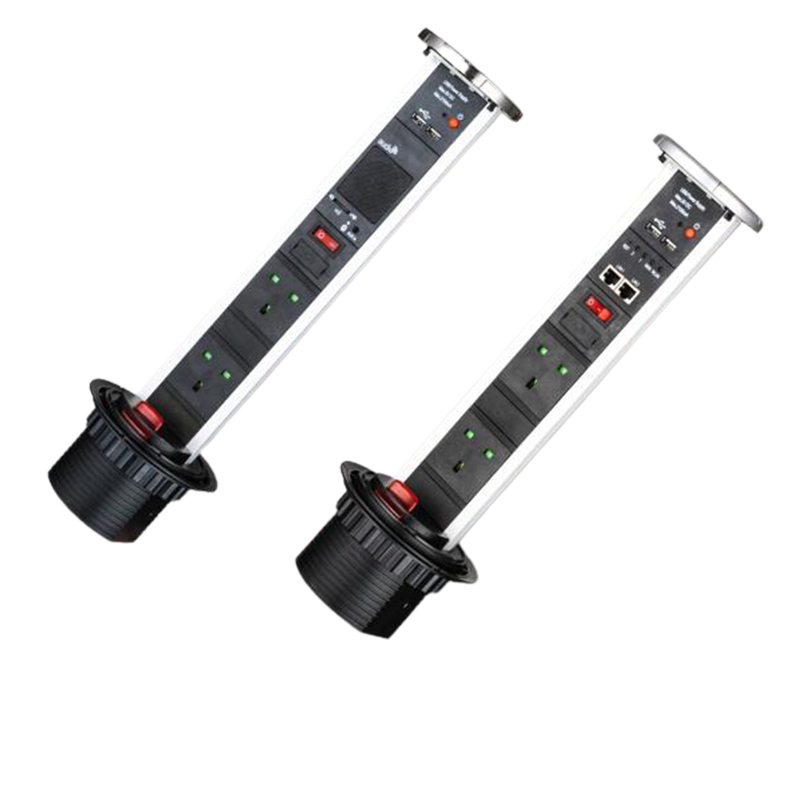
A co-working desk socket is the desktop-mounted or desk-integrated power distribution point that supports a co-working user’s laptop, monitor, phone, and peripherals. The socket is the operationally honest answer to the question of how the co-working space delivers power to the desk without scattering power strips across the floor and without forcing the user to bring a power strip from home. The 2026 co-working desk socket is a pop-up tower or in-desk grommet with integrated USB-A and USB-C PD charging, surge protection, and child safety shutters, all rated for the daily insertion cycle of a co-working user.
Why the three specs matter. The three specs are the operational definition of a 2026 co-working desk socket. A socket that meets the density but fails the durability must be replaced in 18 months, not 5 years. A socket that meets the durability but fails the density cannot support a 100% occupied day. A socket that meets all three specs is the operationally honest answer to the question of whether the co-working space can deliver power to the desk for the full operational life of the co-working user.
Why the form factor matters. The 2026 co-working desk is operationally a clean-desk surface, and the form factor is the operationally honest answer to the question of how the socket appears on the desk. A pop-up tower is hidden when not in use. An in-desk grommet is mounted in a fixed position. An under-desk mounting bracket is mounted under the desk and is always accessible. The form factor is the operationally honest answer to the question of how the co-working user accesses the socket during the work session.
The Three Operational Specs — Density, Durability, Replacement
| Spec | What it controls | Typical value | Failure mode if the spec is loose |
|---|---|---|---|
| Density (sockets per desk) | Number of socket points per desk | 1-2 | Co-working user cannot find a socket during a 100% occupied day |
| Durability (insertion cycles) | Rated mechanical life of the socket contacts | 10,000-15,000 | Socket fails at 2 years instead of 5 years |
| Replacement cycle (years) | Operational life of the socket in the co-working application | 3-5 | Socket replaced at 18 months instead of 5 years, doubling the total cost of ownership |
The three specs are operationally coupled, and the spec writes the coupling as three separate line items. The density is the number of socket points per desk and per person. The durability is the rated insertion cycle, typically 10,000-15,000 for a 2026 commercial-grade socket. The replacement cycle is the operational life of the socket, typically 3-5 years for a co-working application at 8-12 insertion cycles per day, 250 days per year. A spec that names one spec without the other two is a spec that forces the supplier to make the other two decisions on the supplier’s house default, which is the high-cost answer.
Pop-Up Tower vs In-Desk Grommet vs Under-Desk Mounting
Pop-up tower is the clean-desk answer. A pop-up tower socket is mounted in a circular cutout in the desk surface. When not in use, the tower is hidden in the cutout. When needed, the user pulls the top of the tower up by hand, and the tower locks in the raised position. The pop-up tower is the operationally honest answer for the 2026 co-working desk that wants a clean desk surface when the user is not actively charging.
In-desk grommet is the always-on answer. An in-desk grommet socket is mounted in a fixed cutout in the desk surface, and the socket is always visible. The in-desk grommet is the operationally honest answer for the always-on desk where the socket is part of the desk’s permanent interface, and the user does not want to reach for a hidden tower.
Under-desk mounting is the accessible answer. An under-desk mounting bracket is mounted under the desk surface, and the user reaches under the desk to access the socket. The under-desk mounting is the operationally honest answer for the desk that wants to keep the surface clear and the user does not mind reaching under the desk. The under-desk mounting is typically the lowest-cost form factor because it does not require a desk cutout.
5-Step Specification Protocol for a Co-Working Desk Socket
Step 1 — Define the density and the outlet count
Define the density (sockets per desk, sockets per person) and the outlet count per socket (power outlets, USB-A, USB-C PD). The density is the operationally honest answer to the question of whether the co-working space can support a 100% occupied day.
Step 2 — Pick the form factor
Pick the form factor: pop-up tower socket, in-desk grommet socket, or under-desk mounting bracket. The form factor is the operationally honest answer to the question of how the socket appears on the desk and how the cable is managed.
Step 3 — Set the durability and the replacement cycle
Set the durability (in insertion cycles) and the replacement cycle (in years). A co-working desk socket runs at 8-12 insertion cycles per day, 250 days per year, and the durability is the operationally honest answer to the question of when the socket should be replaced.
Step 4 — Set the USB and the smart-features
Set the USB and the smart-features: USB-A (5V/2.4A), USB-C PD (up to 100W), surge protection, child safety shutters, optional energy monitoring or scheduling. The smart-features are the operationally honest answer to the question of whether the cord is a passive socket or a connected socket.
Step 5 — Lock the safety and compliance baseline
Set the safety and compliance baseline: IEC 60884-1 for plugs and socket-outlets, IEC 62368-1 for IT equipment safety, BS 6396 for UK office furniture electrical systems, UL 962 for US household and commercial furnishings, CE marking, RoHS (2011/65/EU), and REACH (EC 1907/2006). The compliance baseline is the operational gate on the co-working space launch.
How to Read a Co-Working Case Study Without Cherry-Picking
Case studies are useful when they are read for the spec, not the headline. The office project experience page and the desktop socket category are the right place to start; reading well means looking past the marketing image to the actual three-spec data, the form factor, and the safety and compliance documentation.
Five questions to ask when reading a case study:
- What is the density? (Sockets per desk, sockets per person. The density tells you the operational capacity of the co-working space.)
- What is the form factor? (Pop-up tower, in-desk grommet, under-desk mounting. The form factor tells you the clean-desk aesthetic and the user-experience decision.)
- What is the durability? (Insertion cycles rated. The durability tells you the replacement cycle.)
- What is the USB and smart-features? (USB-A, USB-C PD, surge protection, child safety shutters, optional energy monitoring. The features tell you the 2022-vs-2026 answer.)
- What is the safety and compliance documentation? (IEC 60884-1, BS 6396, UL 962, CE, RoHS, REACH. The documentation tells you the destination market.)
A case study that does not answer all five questions is a marketing piece, not a spec anchor. The Newsunn Power product pages and the office project experience page are structured to give you all five.
What to Ask a Desk Socket OEM Supplier Before You Commit
Five questions that catch 80% of the co-working desk socket procurement issues before a commitment is made. The questions sound basic; they catch real failures.
- Does the supplier have a current reference deployment at a co-working operator with similar density and usage profile? A current deployment is the operational proof. A supplier without a current deployment is a supplier without operational proof.
- What is the rated insertion cycle and the tested replacement cycle, verified by an independent test report? The supplier’s answer tells you whether the 10,000-15,000 cycles is an accelerated test claim or a real-world claim.
- Does the supplier carry a current IEC 60884-1, BS 6396, or UL 962 test report, depending on the destination market? The test report is the operational proof that the socket meets the destination market’s safety and compliance standard.
- Does the supplier offer USB-C PD, and what is the maximum wattage? The supplier’s answer tells you whether the socket is the 2022 baseline or the 2026 baseline.
- Can the supplier provide a sample run with the final configuration, the final color, and the final packaging, for facility manager approval before the production run ships? A sample run is the operational proof. A supplier without a sample run is a supplier without operational proof.
One last thing: ask for a sample run with the final configuration, the final color, and the final packaging, before committing the production run. A legitimate desk socket OEM supplier provides the sample run in 25-35 working days, with the final configuration applied. The cost of the sample is the noise of the cost of a misfit co-working deployment.
Conclusion — Why a Tight Desk Socket Spec Is Cheaper Than a Loose One
Co-working desk socket sourcing in 2026 is a three-spec discipline (density, durability, replacement cycle), gated by a five-step specification protocol, anchored at the form factor decision, and validated by a sample run with the final configuration. The spec is the controlling document for the three specs, and the spec is what makes the co-working desk socket a multi-year operational asset rather than a one-time capital purchase with a marketing claim.
We have walked through what we do at Newsunn Power (Ningbo Newsunn Power Co., Ltd.) — the PDU and desktop socket engineering with 10+ years of experience, 8 R&D engineers, and 30,000 m² production base. The desktop socket category covers the full socket range, the wholesale desktop USB sockets (tower socket) is the reference product for the pop-up tower configuration, and the about us (office project experience) page documents the office deployment track record.
If you are specifying a co-working desk socket for a new facility or a refresh, or evaluating an existing program for a USB-C PD upgrade, our team can run a free spec review with you. Send us your target density, your target form factor, your target insertion cycle, your safety and compliance scope, and your volume commitment, and we will come back within 24 hours with a written spec recommendation and a sample-run plan.
Frequently Asked Questions
What density of desk sockets does a co-working space need?
A typical 2026 co-working space runs at 1-2 desk sockets per desk and 1 desk socket per person, depending on the desk layout (individual desks, shared benches, hot desks) and the user profile (laptop-only, laptop + monitor, laptop + multiple peripherals). A 100-desk co-working space with 200 users needs 100-200 desk sockets, depending on the density decision. The density is the operationally honest answer to the question of whether the co-working space can support a 100% occupied day without power-tripping.
What is the typical durability of a co-working desk socket?
A typical 2026 co-working desk socket is rated for 10,000-15,000 insertion cycles, depending on the contact material (silver alloy, copper alloy, gold-plated) and the mechanical design. A co-working desk socket runs at 8-12 insertion cycles per day, 250 days per year, and the durability is the operationally honest answer to the question of when the socket should be replaced. A 10,000-cycle socket at 10 cycles per day lasts 2.7 years; a 15,000-cycle socket at 10 cycles per day lasts 4.1 years.
What is the typical replacement cycle of a co-working desk socket?
A typical 2026 co-working desk socket has a replacement cycle of 3-5 years, depending on the daily insertion cycle, the contact material, and the mechanical design. A high-traffic co-working desk at 12 insertions per day replaces the socket every 2.5-3 years. A low-traffic co-working desk at 6 insertions per day replaces the socket every 5-6 years. The replacement cycle is the operationally honest answer to the question of the total cost of ownership for the socket.
What is the difference between a pop-up tower socket and an in-desk grommet socket?
A pop-up tower socket is hidden in the desk when not in use, raised by hand when needed, and lowered when done. The pop-up tower is the operationally honest answer for the clean-desk aesthetic. An in-desk grommet socket is mounted in a fixed grommet in the desk, and the socket is always visible. The in-desk grommet is the operationally honest answer for the always-on desk where the socket is part of the desk’s permanent interface.
What is the difference between a pop-up tower socket and an under-desk mounting socket?
A pop-up tower socket is mounted in the desk surface and is raised or lowered by hand. An under-desk mounting socket is mounted under the desk surface and is always visible. The pop-up tower is the clean-desk aesthetic; the under-desk mounting is the always-accessible answer. The under-desk mounting is the operationally honest answer for the desk that wants to keep the surface clear, and the user does not mind reaching under the desk for the socket.
Send Your Desk Socket Spec — Get a Free Co-Working Project Review
If you are specifying a co-working desk socket for a new facility or a refresh, or evaluating an existing program for a USB-C PD upgrade, send us your target density, your target form factor, your target insertion cycle, your safety and compliance scope, and your volume commitment. Our team will come back within 24 hours with a written spec recommendation (density, form factor, durability, USB and smart features, safety and compliance) and a sample-run plan covering the final configuration, color, and packaging.
Browse the desktop socket category →See the wholesale desktop USB sockets (tower socket) reference product and the office project experience for the deployment track record.
Post time: Oct-14-2026