

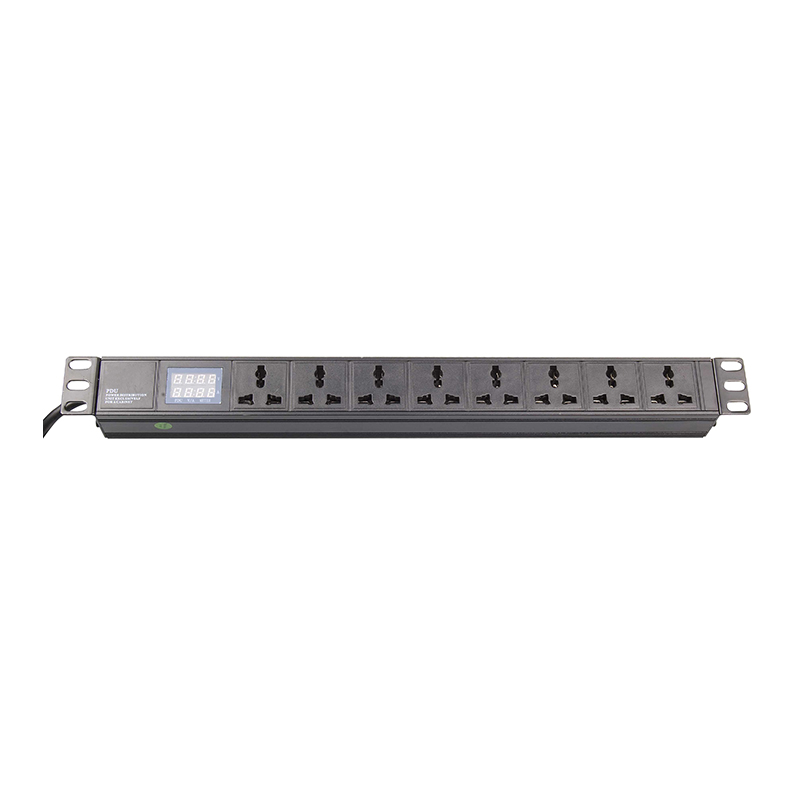
TL;DR — What Size PDU Do I Need? The 5-Step Answer in 60 Seconds
- Step 1 is total load: add up the peak watts of every device in the rack, convert to amps using your line voltage, then add 20-30% headroom before sizing the breaker.
- Step 2 is phase selection: stay on single-phase up to about 32A, switch to three-phase above 32A because the wire gauge for higher single-phase current becomes impractical in a rack.
- Step 3 is outlet matching: C13 for servers and switches, C19 for high-current devices, plus the country-specific plug (UK BS 1363, German Schuko, NEMA 5-15, French Type E) that matches the rack location.
- Step 4 is form factor: 0U vertical when you need more than 12 outlets, 1U horizontal when 12 or fewer is enough, 2U horizontal when you want a display screen plus 12-24 outlets.
- Step 5 is future-proofing: ATS for redundant feeds, monitored intelligent PDU for per-outlet alerts, and 30-50% headroom on outlet count for the next two server refresh cycles.
Step 1: Add up the load (watts, amps, headroom)
Step one is to add up the load, because the wrong size PDU either trips the breaker on day one or wastes money on excess capacity. Start with the peak watt rating of every device in the rack, not the nameplate, because servers and switches draw less at idle than at peak CPU or fan load.
For a 1U server, the peak watt rating is usually 350-450W per unit under full CPU load. For a 2U server, the range is 600-900W. For a top-of-rack switch, 150-300W depending on port count. For a small SAN or storage array, 500-1500W depending on disk count and spin. Add the actual peak watt ratings, then convert to amps using your line voltage: amps = watts / (volts × power factor). For 230V single-phase at power factor 0.9, the conversion is amps = watts / 207. For 120V single-phase at power factor 0.9, amps = watts / 108.
The headroom rule is the part most buyers skip. Industry standard headroom is 20-30% above peak measured load. Below 20% and you risk nuisance breaker trips during peak demand or during a fan failure on one server. Above 30% and you are oversizing the PDU and the upstream breaker for no operational benefit. If your rack has expansion room for new servers or switches, add the planned future load to the headroom calculation before sizing the circuit breaker.
A rack with 8 servers at 400W each, 2 switches at 200W, and 1 SAN at 1000W peak loads to 4,800W. At 230V single-phase: 4,800 / 207 = 23.2A. Plus 25% headroom = 29A. The right PDU is single-phase 32A.
Worksheet field 1B: Line voltage (V) = _______
Worksheet field 1C: Calculated amps (W / V × 0.9) = _______
Worksheet field 1D: Plus 25% headroom = _______
Step 2: Pick single-phase or three-phase input by total amps
Phase selection is where most PDU sizing worksheets fail, because the line between single-phase and three-phase is not intuitive. Stay on single-phase up to about 32A, switch to three-phase above 32A because the wire gauge for higher single-phase current becomes impractical in a rack. The threshold is not about what the PDU can technically handle, it is about the upstream breaker, the wire run from the panel, and the rack-side cord gauge.
Single-phase 16A is the right answer for racks under about 3 kW of IT load — small edge deployments, network closets, single-server rooms. Single-phase 32A covers the 3-7 kW range that dominates mid-sized server rooms and most colocation cabinets. Single-phase 63A covers 7-14 kW but requires heavier gauge wiring from the panel, and most data center operators switch to three-phase above this load.
Three-phase input splits the load across three phases, which means the per-phase current drops by a factor of three for the same total power. For a 20 kW rack, three-phase 32A input means 32A per phase, which is roughly 10.7A per phase from a 230V source — manageable wire gauge and a standard 32A three-phase breaker. The same 20 kW on single-phase would require 87A at 230V, which means a 100A breaker and #3 AWG or larger wire to the rack — impractical for most installations.
Newsunn’s catalog at our 19-inch power distribution unit page covers both single-phase and three-phase options, with form factors ranging from 1U horizontal to 0U vertical. The decision rule we use on our own sizing: if your worksheet field 1D (amps plus 25% headroom) lands above 32A, the answer is three-phase. If it lands at or below 32A, stay on single-phase and pick the smallest catalog breaker that fits.
Worksheet field 2B: Phase choice (single-phase / three-phase) = _______
Worksheet field 2C: PDU amp rating (16A / 32A / 63A) = _______
Step 3: Match outlets to your equipment plugs
Outlet selection is the step where the catalog PDU and the actual rack equipment have to match exactly. C13 is the universal outlet for servers and switches under about 10A, C19 is the high-current outlet for equipment drawing up to 16A, and country-specific plugs (UK BS 1363, German Schuko, French Type E, NEMA 5-15) match the rack location’s wall outlet standard. Mixing these up means your servers physically cannot plug into the PDU, and you find out at installation.
Every server ships with a C14 plug mating a C13 outlet. C19 outlets are IEC 60320 C19 connectors for equipment drawing 16A, which is most high-density blade servers, large SAN arrays, and high-wattage network switches. C19 outlets also accept C20 plugs from the equipment side. PDUs typically mix C13 and C19 outlets in a single unit, with the ratio depending on the rack’s load profile.
Country-specific outlets matter for the input side of the PDU and for any equipment that is hardwired rather than plugged in. A rack in the UK runs on BS 1363 wall outlets with fused plugs, a rack in Germany runs on Schuko, a rack in France runs on Type E with grounding pin, a rack in the US runs on NEMA 5-15 or NEMA 5-20. Newsunn covers all four standards plus the universal IEC 60320 combination outlet that accepts any of the country plugs, which is the right answer for racks that may move between facilities or operate in multi-standard environments like the Middle East or Africa.
Most buyers undercount. Count every plug that will ever land in the rack over the next two server refresh cycles, add 20% for unplanned equipment, and that is the outlet count the PDU needs. Most Newsunn PDUs in our 19-inch power distribution unit catalog ship with 6 to 24 outlets in mixed C13/C19 configurations. Above 24 outlets, switch to 0U vertical.
Worksheet field 3B: C19 outlet count needed = _______
Worksheet field 3C: Country plug standard (BS 1363 / Schuko / Type E / NEMA / Universal) = _______
Worksheet field 3D: Total outlets (3A + 3B + 20% future) = _______
Step 4: Choose 0U, 1U, or 2U form factor by rack space
Form factor decides whether the PDU fits the rack. 0U is vertical (mounts in the back or side of the rack, takes no U space), 1U is horizontal (takes 1U or 1.75 inch), 2U is horizontal (takes 2U or 3.5 inch). The choice depends on outlet count, monitoring requirements, and whether the rack already has horizontal PDUs installed in the 1U or 2U positions.
0U vertical PDUs are the right answer when the outlet count exceeds what a horizontal PDU can carry. A typical 0U vertical PDU holds 24-36 outlets in a slim housing that mounts in the back corner of the rack, leaving all 42U of rack space available for servers and switches. The tradeoff is that 0U PDUs are longer, and the outlets are spread along the length of the housing, which means you need longer power cords on the equipment.
1U horizontal PDUs are the right answer when outlet count is 12 or fewer and the rack has a spare U at the back. A 1U horizontal PDU takes 1U (1.75 inch) of rack space and typically carries 6-12 outlets, which is enough for small server racks and network closets. Most 1U PDUs have rear outlets. The tradeoff is that 1U PDUs do not have room for a display screen, so monitoring requires an external meter or a network-attached intelligent variant.
2U horizontal PDUs are the right answer when you want a display screen plus 12-24 outlets. A 2U horizontal PDU has room for an LCD or LED display on the front face plus 12-24 outlets on the rear, which lets you see total load at the rack without an external meter. For data center, 2U is the form factor of choice. The tradeoff is 2U of rack space consumed, which is significant if rack space is tight.
Worksheet field 4B: Available rack units for horizontal PDU = _______
Worksheet field 4C: Total outlet capacity of the selected PDU = _______
Step 5: Future-proof for redundancy (ATS, monitoring, hot-swap)
Future-proofing is the step most buyers skip and then pay for twice. The three future-proofing moves are ATS for redundant feeds, monitored intelligent PDU for per-outlet alerts, and 30-50% headroom on outlet count for the next two server refresh cycles. Each adds cost but pays back on the next refresh.
Automatic Transfer Switch (ATS) PDUs take two input feeds and switch between them automatically when the primary feed fails. For mission-critical racks (database servers, application servers, storage arrays that cannot tolerate downtime), an ATS PDU is the right answer because it eliminates the manual intervention step of switching power sources during a utility failure. Newsunn’s catalog includes ATS variants in both single-phase and three-phase, with switching times in the 8-16 ms range. The cost premium over a non-ATS PDU is typically 30-60%.
Monitored intelligent PDUs add per-outlet metering and remote threshold alerts. A monitored PDU reports amperage at each outlet to a network dashboard, and can alert the operator when an outlet approaches the PDU breaker limit before the breaker trips. For data center applications where unplanned downtime costs hundreds to thousands of dollars per minute, monitored PDUs pay back through avoided outages. Switched intelligent PDUs add per-outlet remote on/off control on top of monitoring, which lets the operator reboot a hung server without walking to the rack.
Headroom on outlet count is the cheapest future-proofing move. If your Step 3 count landed at 18 outlets, spec a PDU with 24 outlets instead of 18, and you have 6 free outlets for the next server refresh without replacing the PDU. Newsunn’s engineering team can confirm outlet count options on any of our catalog PDUs before you specify the unit. If the next server refresh is going to add high-density gear like blade servers or 800G switches, that 50% headroom is the right number rather than 30%.
Worksheet field 5B: ATS required (yes / no) = _______
Worksheet field 5C: Monitoring level (metered / monitored / switched) = _______
Worksheet field 5D: Future headroom on outlets (30% / 50%) = _______
The five-step worksheet: fill this in before you spec a PDU
Newsunn PDU Sizing Worksheet — Fill in Before You Spec
- Step 1 Load: Total peak watts = _______ · Line voltage = _______ · Calculated amps = _______ · Plus 25% headroom = _______
- Step 2 Phase: Total amps from Step 1 = _______ · Phase = _______ · PDU amp rating = _______
- Step 3 Outlets: C13 count = _______ · C19 count = _______ · Country plug = _______ · Total with future = _______
- Step 4 Form Factor: Form factor = _______ · Available U = _______ · Outlet capacity = _______
- Step 5 Future-proof: Redundancy = _______ · ATS = _______ · Monitoring = _______ · Headroom = _______
With all five steps filled in, the PDU spec is one line: form factor, amp rating, phase, outlet mix, country plug, monitoring level. That line maps directly to a Newsunn catalog part number, and if any field falls outside the standard catalog we can quote a customized unit on the same 30-day lead time as our standard PDUs.
Send Newsunn your worksheet: what to include for a 24-hour sizing review
If you have filled in the five-step worksheet and want a second opinion before you spec the PDU, send Newsunn your engineering team the completed worksheet plus four supporting items. A sizing review takes about 24 hours once we have the worksheet, the rack layout drawing, the load list, and the country of installation.
Include four items. First, the completed five-step worksheet (the orange box above). Second, the rack layout drawing showing where the PDU physically mounts and what equipment occupies each U position. Third, the load list with peak watt ratings for every device in the rack. Fourth, the country of installation (because that drives the input plug standard). With those four items, we can confirm the PDU spec or recommend a variant within one business day.
The sizing review catches three things. First, whether the Phase and Amp rating from Step 2 actually matches the upstream breaker available at the rack location. Second, whether the outlet mix from Step 3 has the right C13/C19 ratio for the equipment on the load list. Third, whether the form factor from Step 4 fits the rack physically (some racks have zero spare U for a 1U or 2U PDU, which forces 0U vertical). Each is a cost driver or a deployment blocker, so catching them before the PO saves time on both sides.
Frequently asked questions about PDU sizing
How many amps does a typical 19 inch server rack PDU need?
Most single-cabinet server racks with 5-10 kW of IT load run on a single-phase 32A PDU. Larger racks with 10-20 kW run on single-phase 63A or three-phase 32A. Racks above 20 kW almost always run on three-phase 63A. The 32A single-phase threshold is where most data centers switch to three-phase input because the wire gauge for higher single-phase current becomes impractical in a rack.
What is the difference between 0U, 1U, and 2U PDU form factors?
0U is a vertical PDU that mounts in the back or side of the rack and does not consume rack space. 1U is a horizontal PDU that takes 1 rack unit (1.75 inch) of space and typically has 6-12 outlets. 2U is horizontal with 2 rack units (3.5 inch) and can fit 12-24 outlets plus a monitoring display. Pick 0U when you need more than 12 outlets, pick 1U when 12 or fewer is enough, pick 2U when you want a display screen plus 12-24 outlets.
What headroom should I add to my PDU load calculation?
Industry standard is 20-30% headroom above peak measured load. Below 20% and you risk nuisance breaker trips during peak demand. Above 30% and you are oversizing the PDU and the upstream circuit for no reason. If your rack has expansion room for new servers or switches, add the planned future load to the headroom calculation before sizing the circuit breaker.
Should I buy a metered or monitored intelligent PDU?
Buy metered if you need total load visibility but no per-outlet control. Buy monitored if you need per-outlet amperage and remote threshold alerts. Buy switched if you need per-outlet remote on/off control. For most data center applications the answer is monitored, because per-outlet alerts catch individual server overloads before they trip the rack breaker. Switched is the next step up and is standard in colocation facilities where remote reboot capability matters.
Post time: Aug-07-2026